Yes. You can do this yourself, and you do not have to delete the project or write to us.
The quick way
- Open your profile and go to the Projects tab.
- Find the project and open the three-dot menu on its card.
- Choose Unpublish, then confirm.
The project leaves your public profile, search, the discover feeds and the editorial and homepage selections straight away. You and your team keep full access, and the same menu publishes it again when you are ready.
Choosing who can see it
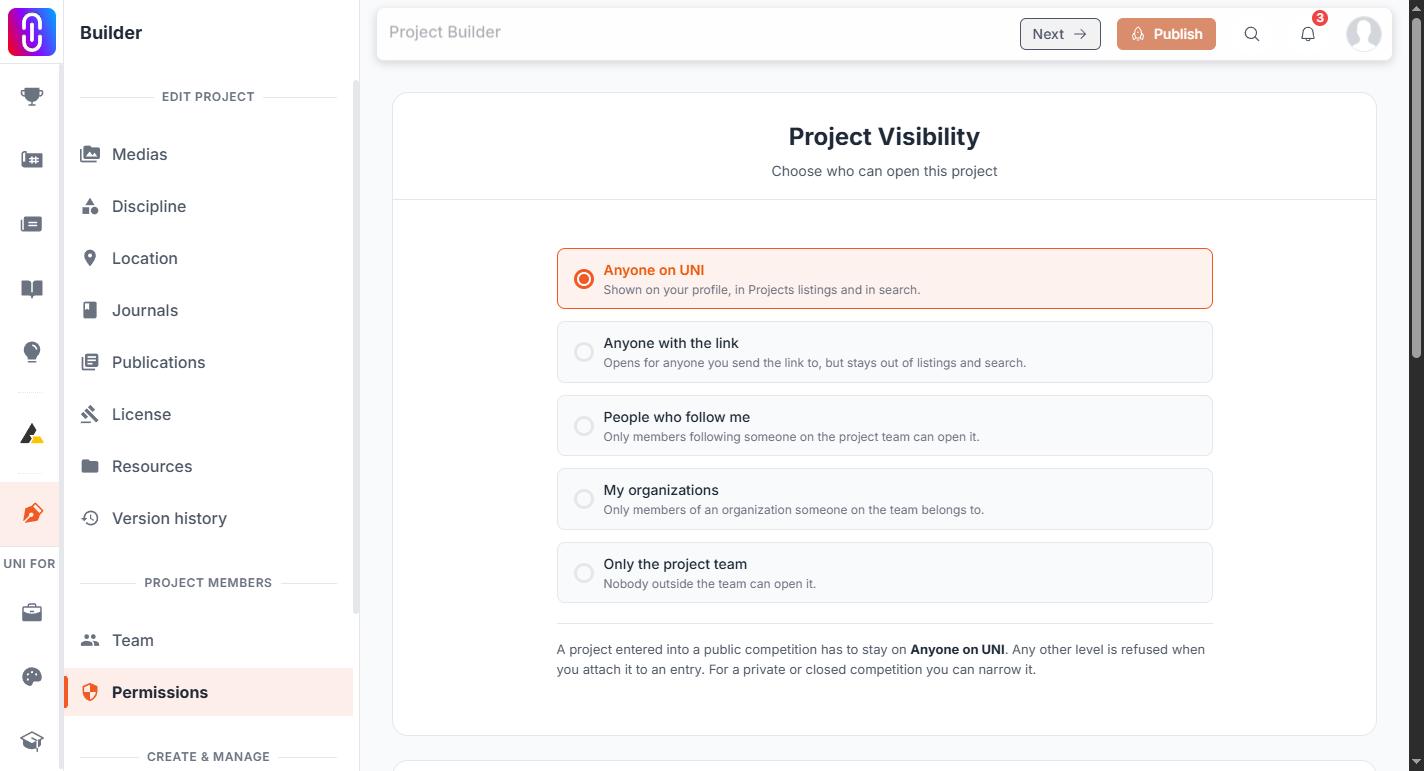
If you want something between fully public and fully hidden, open the project in the builder and go to Settings, then Permissions. Project visibility has five settings:
- Anyone on UNI - the normal public project.
- Anyone with the link - not listed anywhere, but the URL works for whoever you send it to.
- People who follow me - visible to your followers, and to your team.
- My organizations - visible to members of organizations you belong to.
- Only the project team - visible to nobody else at all.
Anything other than Anyone on UNI counts as private for the rules below.
What private does, and what it does not
A private project is left out of the public project lists, out of search, out of the discover feeds, and out of the editorial and homepage selections. Its page stops opening for anyone the visibility setting does not cover.
Two things worth knowing about competitions:
- A private project cannot be attached to a new competition entry. Public competitions need the project set to Anyone on UNI. A private closed competition can work with a narrower setting.
- If the project was already submitted as an entry, it can still be reached through that competition's entry pages. Write to us with the competition name and we will deal with the entry as well.
It is on the record
Changing visibility, unpublishing or republishing is written to the project's version history, so you and your team can see what changed and when.
Next time
A project stays a draft, visible only to you and the project team, until you press Publish in the builder. Nothing else makes it public, so there is no need to publish before you are ready. Saving your work in the builder does not publish it either.