Jurors score entries against named criteria in evaluation rounds, and you can see your own scores and juror remarks on your entry's analytics page once the submission deadline has passed.
How jurors are assigned
Jurors are assigned to evaluation rounds, not to individual entries. A round can cover every entry in the competition or a specific set of entries, depending on how the competition is set up. A juror can only score entries in a round they belong to.
How scoring works
Within a round, jurors score each entry against named criteria rather than giving one overall number. Each criterion has its own minimum and maximum score, and a score outside that range is rejected.
Your scores are then averaged: across the jurors who scored you on a criterion, and across the criteria. That average is what orders the leaderboard.
Juror identities are not shown to entrants. Scores and remarks appear against anonymous labels so that feedback stays candid.
Seeing your own scores
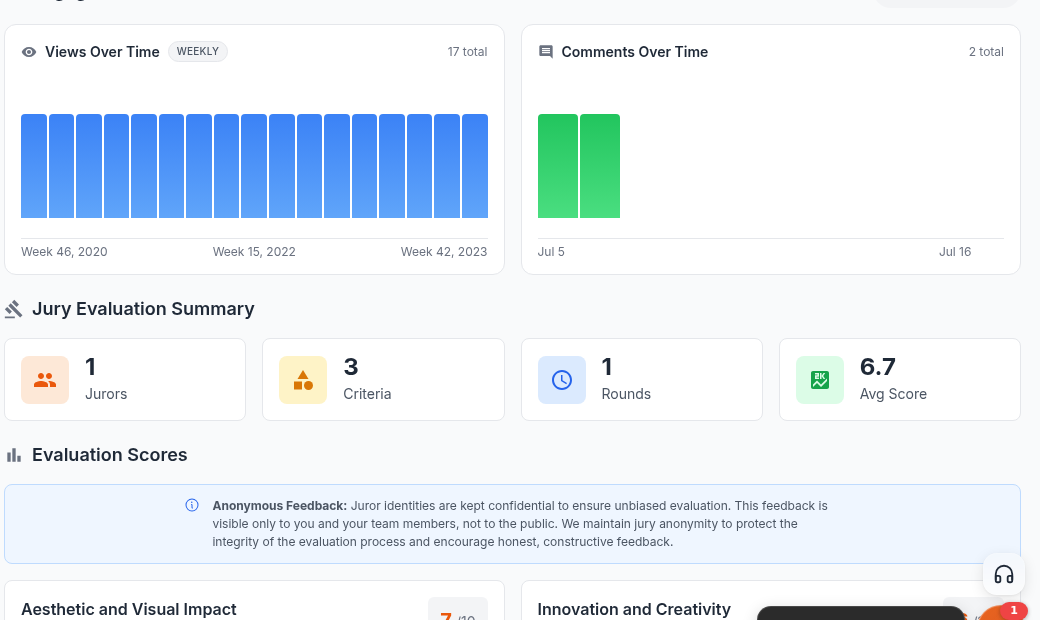
Once the submission deadline has passed, your entry gets an Analytics button on the Competitions page of your profile. That page shows:
- Your score on each criterion.
- Any written remark a juror left with a score.
- A summary of the jury evaluation, including how many jurors scored your entry.
This is visible only to you and your team members. It is not public.
The Competition Ranking shown on that page is an indicative position that also takes public ratings and likes into account. It is not the jury result.
Shortlisting
Entries can be marked as shortlisted as the field narrows, ahead of a final result. The shortlist becomes visible once the competition's shortlist date has passed. Until then, the Entries and Leaderboard sections are hidden on the competition page. Some competitions choose to show the entries list earlier, but the shortlist itself still waits for that date.
Results
Final results appear on the competition page once the result date has passed and the results are published. Awards are assigned by the UNI team, not calculated automatically from a vote count.
Every competition sets its own dates. Check the Schedule section on the competition page for that competition's jury, shortlist and result dates, and the Jury section for its panel. All dates are shown in UTC.