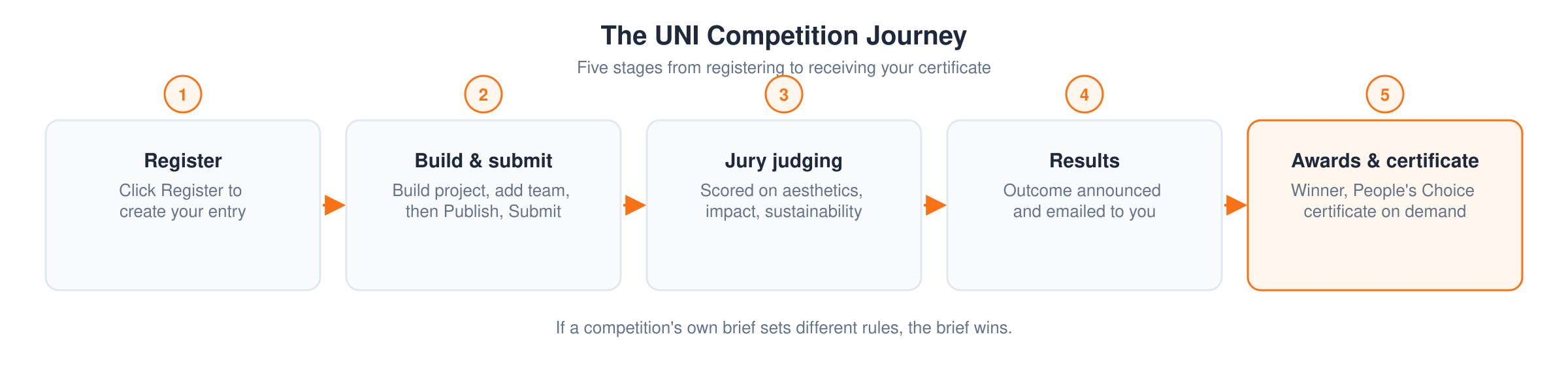
These are the general rules for competitions hosted on UNI. If a competition publishes its own brief with different rules, the brief wins. Always read the brief for the competition you are entering.

1. Resources
Your competition entries page
Registering creates an entry. Every entry you hold lives at uni.xyz/profile/edit/{your-username}/competitions, reachable as My Competitions in the account menu. That page carries each entry's status, its next deadline, and the buttons for submitting, withdrawing and generating a certificate.
Additional resources
Some competitions publish extra material beyond the brief: CAD files, 3D files, site or product images, research notes. It appears as Additional Resources in the competition page sidebar, and as a Resources button on your entry card.
Not every competition has it. When there is none, the brief is the whole requirement, and you can save a copy with Print Brief on the competition page.
See How to access additional resources for who can open them.

2. Submission recommendations
These are recommendations, not enforced limits. A competition brief can set its own requirements.
Presentation boards
Five boards at roughly 2800px by 3500px, portrait, saved as JPEG, is the format most entrants use. Three is a workable minimum and there is no upper limit.
Portrait is preferred, not required. Landscape boards are accepted too, unless the competition's own brief asks for a particular orientation.
The uploader accepts images up to 20MB each. Images above about 4000px on a side are resized automatically when they are processed, so exporting far above the recommended size gains you nothing.
After registration you get access to submission sheet templates you can build on.
Cover image
Your cover image is the thumbnail everyone sees first. Unlike the boards, the cover must be landscape, in a 2:1 ratio such as 1920 x 960 pixels. Keep text off it and make sure it still reads at small sizes.
High resolution work
If your work needs resolution beyond what boards allow, compile it into a PDF, publish it as a publication and link that publication to your project. See how to use the publications page.
A fuller submission
Boards are yours to design, but strong entries usually include a location plan, the key conceptual and technical details, at least four 3D views, and often a video walkthrough.
The journal entry
A 700 to 1000 word article in the Journal section is a good companion to the boards, and some briefs ask for one. See how to use the journal editor.
Tips
- Keep names, affiliations and identifying marks off your sheets.
- Number each sheet in a corner.
- Everything is viewed digitally. Nothing is printed.
- Use whatever explains the idea best: exploded views, sketches, diagrams, text.
- AI tools are allowed for concept development and presentation.

3. How to enter
Step 1: register
Click Register on the competition page. Registering creates your entry and, where the competition has them, opens its additional resources.
Step 2: build your project
Work on your project and, if you are writing one, your journal article. Your entries page links back to everything you need.
Step 3: add your team
Add team members to the project itself, any time before you submit. You do not need them at registration. See How to invite team members to your project.
Step 4: publish, then submit
Publish the project, then open My Competitions, find the competition's card and click Submit to connect your published work to the entry. See the submission guide for the full walkthrough, or the upload tutorial.
Notes
- Entries are only accepted through UNI. No other submission route is considered.
- Upload well before the deadline rather than in the final hour.
- Competition specific guidelines override anything on this page.

4. Eligibility
Discipline
Competitions are open across disciplines. You do not have to be an architect or a designer by training.
Age
Entrants must be 18 or over to be awarded a prize.
Nothing checks your age when you register or enter, and no competition asks for a date of birth at submission. The check happens once, at the end: when an award is being closed you are asked for a government issued ID, and that is where age is confirmed before any prize is settled.
Practically, that means an entry from someone under 18 can be submitted and judged, but the award cannot be closed in their name. If that applies to you, write to contact@uni.xyz before the award stage rather than after it.
Student and professional
You register as a student, a professional or an institution, and the category you pick sets the price you pay.
You qualify as a student if you are currently enrolled in a full time graduate or undergraduate programme. Proof of enrolment is asked for later, when a student entry is in line for a prize, so pick the category that is true for you. A team with even one professional member is a professional entry.
Teams
You can enter as an individual or as a team. Team size and whether a mentor may be included are set by each competition's brief, so check it. Add team members to the project, not to the registration.
One person can be part of more than one team.
Institutions
Institutions entering many student projects should look at the Institutional membership or an Institutional Access plan rather than paying per entry. See Institutional Access.

5. Base rules
- Multiple entries. You can enter more than one project in a competition. Each one needs its own registration.
- Identity. Your UNI account is your identity in the competition. Keep the sheets themselves anonymous.
- Nature of the work. Unless a brief says otherwise, treat a UNI competition as a design idea challenge. No built commission is attached.
- Originality. Use of existing work without credit is plagiarism.
- Language. Submissions are in English. If English is not your first language you may submit in your own language with a translated copy of the text alongside it.
- Fees. Entry fees are not refundable.
- Updates. Changes to a brief or schedule are posted on the competition page and in its discussion section.
- Terms. Registering means you accept UNI's terms of service.
- Restrictions. UNI staff, the competition's jury members and their immediate families cannot enter.

6. Disqualification
- Breaking the competition guidelines.
- Contacting jury members about the competition.
- Plagiarism.
- Manipulating likes, whether through fake accounts, bots or impersonation.
You can report an entry with the Report button on the project page or on any project card.
Depending on severity, a breach leads to a soft or hard disqualification. See the terms of service.
For anything you want to raise with the curatorial committee, email contact@uni.xyz, or reach us on the Discord channel or X.

7. Judging
The jury
Each competition names its jury under the Jury section on its page. The wider panel UNI works with is listed on the jurors page.
Criteria
Unless the brief says otherwise, entries are read against:
- aesthetic and visual impact
- innovation and creativity
- functionality and usability
- social impact
- sustainability and environmental impact
A jury can add criteria that suit the specific problem statement. Jury decisions are final.
Rating by other members
Entries can also be rated by UNI members outside the named jury. Rating is a membership benefit, see Membership tiers.

8. Likes and the People's Choice Award
The People's Choice Award goes to the entry with the highest Public Score, judged within the student and professional categories. The Public Score is the number shown on the competition leaderboard and on your entry's Analytics page:
Public Score = (juror's rating x 5) + (project score x 3) + (likes x 0.2)
- Juror's rating is the average score the jury gave the entry. It stays 0.0 until jurors have evaluated.
- Project score is the community rating out of 10. Members on Semester plans and above can rate a project, and every rating counts.
- Likes are public votes, counted in full with no cap.
Because a rating is worth far more than a like, the most-liked entry is not automatically first. The jury awards (Winner, Runner-Up, Honorable Mention and the category awards) are decided by the jury alone. Where a competition has no dedicated jury, the Public Score decides the result, with the community rating and likes carrying the weight.
You can start collecting likes and ratings as soon as your project is published, before the submission deadline, and you are free to share your project link anywhere. The competition schedule on the competition page shows the voting window.
Creating accounts or using bots to inflate likes is a disqualification.

9. Awards and fees
How the prize pool grows
Most UNI competitions use a dynamic fee. The entry price and the prize pool are both set by how many entries the competition already has, so registering early costs you the least while the pool keeps growing behind you. On the standard ladder the bands run up to 200 entries, where the prize pool reaches $7,000.
While registration is open, the competition page shows the largest pool that competition can reach. Once registration closes it shows the band actually reached.
See Static and dynamic entry fees for the full mechanics and for what membership covers.
Types of award
- Winner, Runner-up, Honorable Mention, decided on jury scores.
- People's Choice, decided on likes.
- Organizer's Choice and Editor's Choice, given by the organising and editorial committees.
Individual competitions add their own tiers, such as Shortlisted, Citation, Special Mention or category specific awards.
Certificates
Certificates are issued per entry and generated on demand once the competition reaches the right stage. An entry with nothing connected to it cannot produce one. See How to download your certificate.
Frequently asked questions
A competition's brief says something different. Which applies? The brief. Competition specific guidelines always override this page.
Can I enter more than one project? Yes. Register each one separately.
I am not a designer. Can I still enter? Yes. Competitions are open across disciplines.
What is the difference between the student and professional categories? Students are currently enrolled in a full time programme. Everyone else is a professional, and a team with one professional member is a professional entry.
How big can my images be? Up to 20MB each in the uploader. Images larger than about 4000px on a side are resized when processed, so around 2800px by 3500px per board is a sensible target.
How do I add team members? Add them to the project. See How to invite team members to your project.
What if I miss the submission deadline? Late submissions are not accepted, and entry fees are not refundable. Upload early.
Who do I contact? Email contact@uni.xyz, or use the Discord channel or X.