Creator Revenue Sharing pays creators a share of UNI's monthly membership revenue, based on how many members viewed their work. It is in beta, it is opt-in, and your application has to be approved before you earn anything.
How the money is calculated
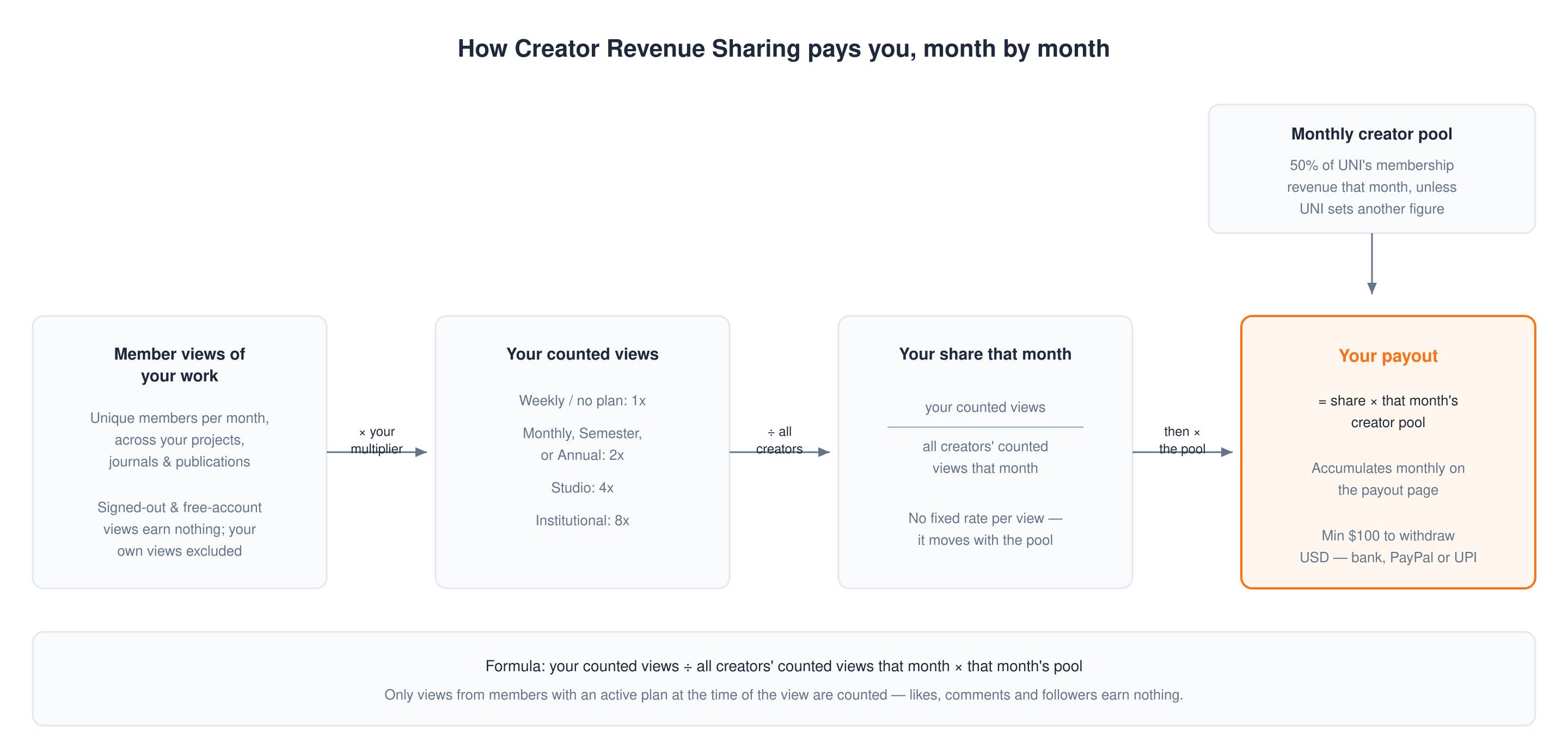
- Each month a percentage of UNI's membership revenue is set aside as the creator pool. That share is 50% unless UNI sets a different figure for a given month.
- Only views from people who had an active UNI membership at the time of the view count. Views from signed-out visitors and free accounts earn nothing, because the money comes from membership fees.
- Views are counted as unique members per month across your projects, journals and publications. Ten visits from the same member in a month count once. Your own views of your own work are excluded.
- Your own membership multiplies the views counted for you: - Monthly, Semester or Annual: 2x (Weekly does not raise the multiplier and counts as 1x) - Studio: 4x - Institutional: 8x - No active membership: 1x
- Your earnings for that month are your share of the pool:
your counted views ÷ all creators' counted views that month × that month's pool
So what you earn depends on the pool that month, how many members viewed your work, which membership you hold, and how much everyone else was viewed. There is no fixed rate per view.
Who can apply
You can apply if either of these is true:
- your profile score is 9.00 or above, which is Creator rank or Expert rank, or
- you hold an active membership on Monthly, Semester, Annual, Studio or Institutional (Weekly does not qualify on its own).
Profile score ranks: Explorer 0 to 4.00, Enthusiast 4.01 to 8.99, Creator 9.00 to 9.89, Expert 9.90 to 10.
How to join
- Go to uni.xyz/accounts/settings/payout.
- In the Creator Revenue Sharing card, select Apply for Revenue Sharing.
- Read the programme terms and select Apply Now.
- Your application sits at Pending until the team reviews it, then becomes Approved or Rejected. A rejection shows its reason, and you can re-apply if you are still eligible.
While an application is Pending you can select Withdraw Application. Once approved you can select Leave Program at any time, and re-apply later.
Programme background is at uni.xyz/about/designers/creator-revenue.
Getting paid
Earnings accumulate month by month on the payout page. The minimum withdrawal is $100 and payouts are made in USD, by bank transfer, PayPal or UPI.
How to collect your payout walks through the withdrawal itself.
What gets you removed
The programme terms list conduct that leads to removal:
- using bots, scripts or fake accounts to inflate views
- publishing duplicate, low-effort, spam or plagiarised content
- view exchanges, click farms or other manipulation
- creating multiple accounts to generate artificial member views
- uploading misleading or inappropriate content, or content that breaks UNI's terms
Violations may result in immediate removal from the programme, forfeiture of unpaid earnings, and a permanent ban from re-enrolling.
Common questions
- Why is my balance 0 when my projects have plenty of views? Either your enrolment is not approved yet, or the views were not from members. The public view count on a project includes everyone; only member views earn.
- Do likes, comments or followers earn money? No. Only member views count.
- Can I withdraw any amount? No. The minimum is $100.
- Is this the same as competition prize money? No. Prize money comes from a competition's own award structure and is claimed through the award closure form. See Claiming prize money.