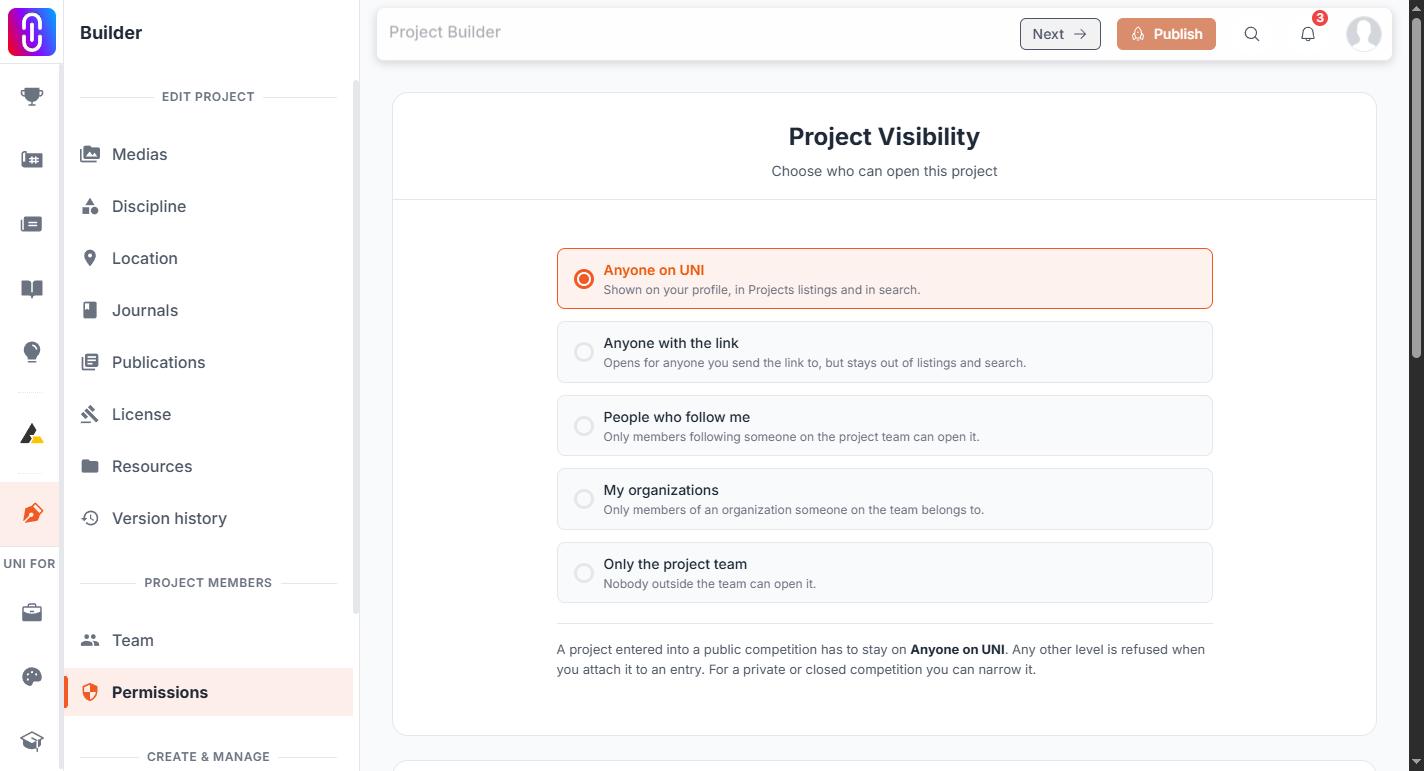
You can, from Project Settings. Open the project in the builder, choose Permissions, and pick a level under Project Visibility:
- Anyone on UNI — the normal state: on your profile, in Projects listings and in search.
- Anyone with the link — opens for anyone you send the link to, but stays out of listings and search.
- People who follow me — only members following someone on the project team.
- My organizations — only members of an organization someone on the team belongs to.
- Only the project team — nobody outside the team.
Anything other than Anyone on UNI takes the project out of listings, search and topic pages straight away.
What you can control today
Three things, and all of them are real:
- Not publishing. A project stays a draft, visible only to you and the people on the project team, until you press Publish in the builder. Saving your work does not publish it, and nothing else makes it public, so there is no need to publish before you are ready. This is the strongest of the three, because an unpublished project has no public form at all, where the visibility levels above narrow who can open one that does.
-
Deleting it. The three-dot menu on the project's card on your Projects page has Delete, and it works. You cannot undo it yourself, so it is the right choice only if you do not want the work on UNI at all.
-
Unpublishing it. Also in Project Settings > Permissions, below the visibility options. This returns the project to a draft rather than narrowing who can open it. The work, its media and its version history are kept, and you can publish it again whenever you like.
One thing to know before you narrow it: a project entered into a public competition has to stay on Anyone on UNI, and any other level is refused when you attach it to an entry. For a private or closed competition you can narrow it.
Who can still see a private project
Private takes the project out of the places people browse. It does not lock the project.
- You and everyone on the project team. The builder, your Projects page and version history carry on working normally.
- The UNI team, for support and moderation.
- Anyone arriving through a competition entry. If the project was submitted to a competition, that competition's entry pages still reach it. Say which competition when you write in, so the entry is dealt with at the same time.
Everyone else is turned away. A private project is left out of project browse, search, the discover and inspiration feeds, the atlas map and the editorial and homepage selections, and its own address stops opening.
Treat private as unlisted rather than sealed
Private is applied list by list rather than as a single lock on the project, so read it as "not shown to people browsing UNI" rather than "unreachable by anyone". For work that a competition rule, a client agreement or an embargo says must not be seen at all, keeping it unpublished or deleting it is the honest answer, and private is not.