You delete or deactivate your account yourself, from your own signed-in account. That is the only route inside the product, and it is deliberate. If you cannot sign in at all, the team can action it for you after verifying who you are.
Delete your account
- Go to uni.xyz/accounts/settings/security (your account menu, then Settings, then Security). The option lives there, not on your public profile, which is why it can be hard to find.
- Under Manage account, choose Request account deletion.
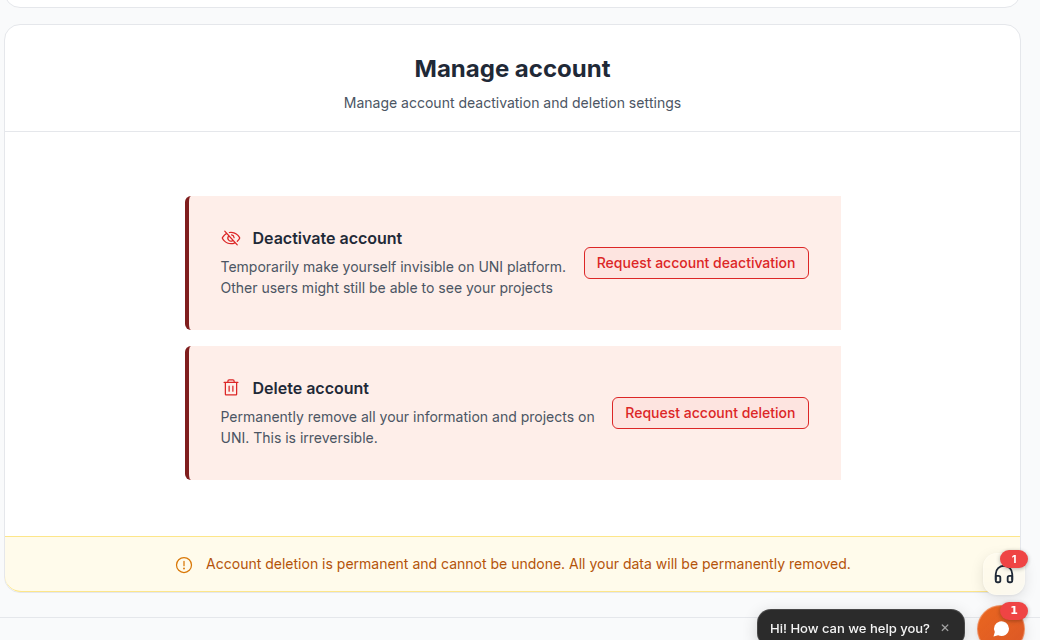 3. Type DELETE in the confirmation box and confirm. Nothing is submitted until you type it.
4. Your account is deactivated immediately. Your profile stops loading for other people and you are signed out.
3. Type DELETE in the confirmation box and confirm. Nothing is submitted until you type it.
4. Your account is deactivated immediately. Your profile stops loading for other people and you are signed out.
What happens next
The account is erased 15 days after the request. A job runs once a day and clears the requests whose 15 days are up.
Until then you can still stop it. Signing in does not cancel the deletion on its own. Sign in with the method you normally use (Google, LinkedIn, or an email address and password) and a message appears saying the account is scheduled for deletion, with the date you asked and the date it will be erased. It offers two choices:
- Keep my account cancels the deletion.
- Continue with deletion leaves your request standing.
If you close the message or do nothing, your request stands and the account is erased on the date shown. That means you can sign in just to check where things stand, or to read a reply from the team, without undoing your request by accident.
If you have forgotten the password, use Forgot your password? on the sign in page. The reset email is sent as normal. Sign in with the new password, then choose Keep my account if you want to stop the deletion.
When you request deletion you are emailed a confirmation that gives the date the account will be erased, and explains the choice waiting at sign in. A further email is sent just before the erasure happens, so the last thing you receive from us is the record of it.
There is one exception to the 15 days. If your account holds work other people can see, such as images you uploaded that appear on a shared project page, or membership of an organization, the deletion pauses and a person reviews it, because erasing it would affect other members as well as you. You will be emailed to say what is holding it and what your options are.
A competition entry or your place on a project team does not pause for review. Both follow the same rule as journals: the entry or membership stays, credited to Deleted member instead of your name, so results and team history are not disturbed for anyone else.
Journals follow their own rule, and do not pause for review. A journal that is not attached to a project page or a competition entry is deleted along with your account. One that is attached stays up, credited to Deleted member instead of your name, because taking it down would leave a hole in a page that belongs to someone else.
Organizations are never deleted with an account. They stay, with their members, competitions and history. If you own one and want somebody else to run it, open the organization, go to Members, and use Transfer Ownership on the person taking over before you delete your account. More on that in Closing an organization you own.
If much more time has passed and you have heard nothing, contact the UNI team and they will confirm where your request stands.
Deactivate instead, if you only want to step away
Request account deactivation, on the same page, hides your profile and keeps everything you have made. It asks you to type DEACTIVATE to confirm, then signs you out. Your projects stay published and other people can still see them.
A deactivated account reopens the moment you sign in with Google or LinkedIn. If your account uses an email address and password, sign in stays blocked until the UNI team reactivates it, so ask first if you are not sure which kind you have.
Things people often want instead of deletion
- Hiding your profile from the public site: deactivation does that.
- Stopping the emails: turn them off in Settings, then Notifications, or use the unsubscribe link in the emails you no longer want. Neither one touches your account.
- Removing one project or publication: delete just that item, not the account.
If you cannot sign in at all
The deletion setting only exists inside your signed-in account, so a login problem blocks it entirely. Fix the sign in first.
- Use Forgot your password? on the sign in page. It works for accounts created with Google or LinkedIn too, and gives you a password you can sign in with. It also works on an account you have deactivated or asked to delete.
- If the email does not arrive, check spam, then confirm you are using the address you originally signed up with.
- If none of that works, contact the UNI team. They will verify who you are properly and action the deletion for you.
I can't log in or sign up and nothing works covers the specific causes in more detail.
Your request still counts even if you could not click the button yourself. Nobody has to stay signed up because they lost access to their email.