Institutional Access is bought either as a registration category on a competition, or through an application from the Institutional Access page. It is not the same product as the Institutional membership, which is an individual plan.
Before you start
- Register from the mentor's account where possible. Registering on a mentor's behalf is allowed, but the registration still goes through a check.
- Use an official university email address if you have one. That verifies the institution automatically.
- Institutional Access has to be paid for directly. Membership entries cannot be spent on it, even if you hold a membership with entries left.
Option 1: Apply from the Institutional Access page
Use this route if you want to speak to the UNI team first, or if you are not sure which plan fits your class.
- Open the Institutional Access page.
- Choose Apply Now or Request Demo at the top of the page, or Get Started on the plan card you want. Consortium and multi-campus enquiries use Contact Sales.
- Work through the application. It asks for your institution type, institution details, a contact person, how many students you expect to enrol, the disciplines you are interested in, and the plan you prefer. You can attach accreditation documents or a brochure, which is optional.
- Submit. You get an email with a copy of what you sent, and the form then sends you on to a paid product page. Do not complete that payment before the team has confirmed your plan in writing. The UNI team follows up on the form itself.
Option 2: Register on the competition itself
Use this route when you already know which competition your studio is entering, and that competition offers an Institutional Access category.
- Open the competition page and choose Register.
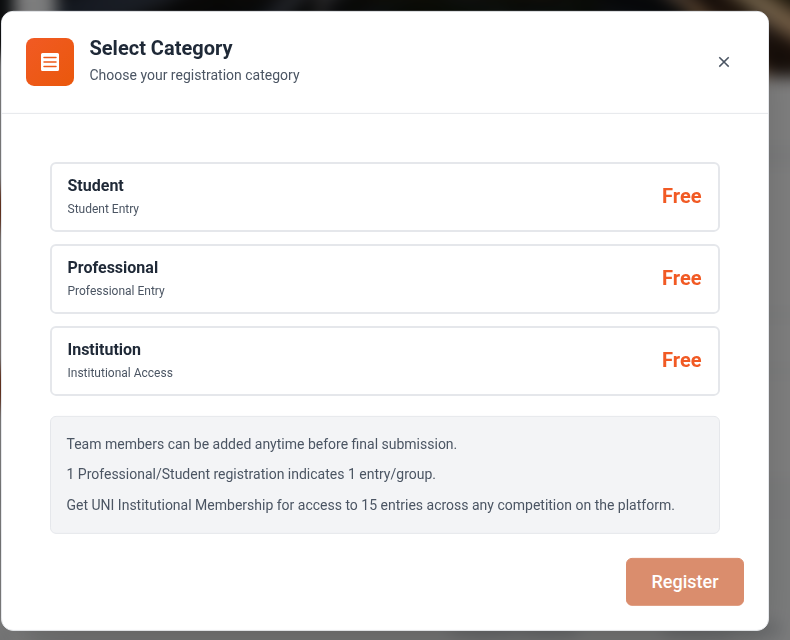 2. In the Select Category window, pick the entry marked Institutional Access.
3. Choose Proceed to Payment.
2. In the Select Category window, pick the entry marked Institutional Access.
3. Choose Proceed to Payment.
Not every competition offers an Institutional Access category. It only appears when the organiser has added one to the open registration deadline, so if you do not see it, that competition does not have it.
If you hold an active membership with entries remaining, and at least one category on the competition is paid, the same window also offers Use Membership Entry. It does not appear on a competition whose categories are all free. That option is not available for Institutional Access categories either way.
How verification works
- Register, ideally from the mentor's university email address. That address verifies the institution on its own.
- If the address is not a university one, the UNI team contacts you within three business days for proof, such as a university identity card or a letter of authorisation from the institution.
- Once your documents have been received, activation takes up to two working days.
What the pass covers
The entry allowance, the number of mentor seats and the term all depend on the plan. Read them from the plan cards on the Institutional Access page before you buy, because that page is where those figures are maintained.
An Institutional Access pass is non-refundable and non-transferable, so check the brief, the schedule and the fee before you pay.
Next steps
- How to add entries, submit projects and form teams under Institutional Access
- What Institutional Access is and who it is for
- Navigating Institutional Access
Before you pay anything, get your entry allowance, term and start date confirmed in writing by the UNI team. The plan cards on the public pricing page are not a contract. Buying a Department, School or University Access product in the shop does now grant its entries automatically, on the organization you own or administer, so make sure you hold one of those roles on the right organization before you pay. If you do not, the payment succeeds and the pool has nowhere to land until support places it by hand.