Deleting a journal removes it permanently. There is no trash, no archive and no undelete. The record is erased from UNI the moment you confirm, and neither you nor UNI staff can bring it back. The confirmation box says the action cannot be undone, and it means that literally.
Where the control is
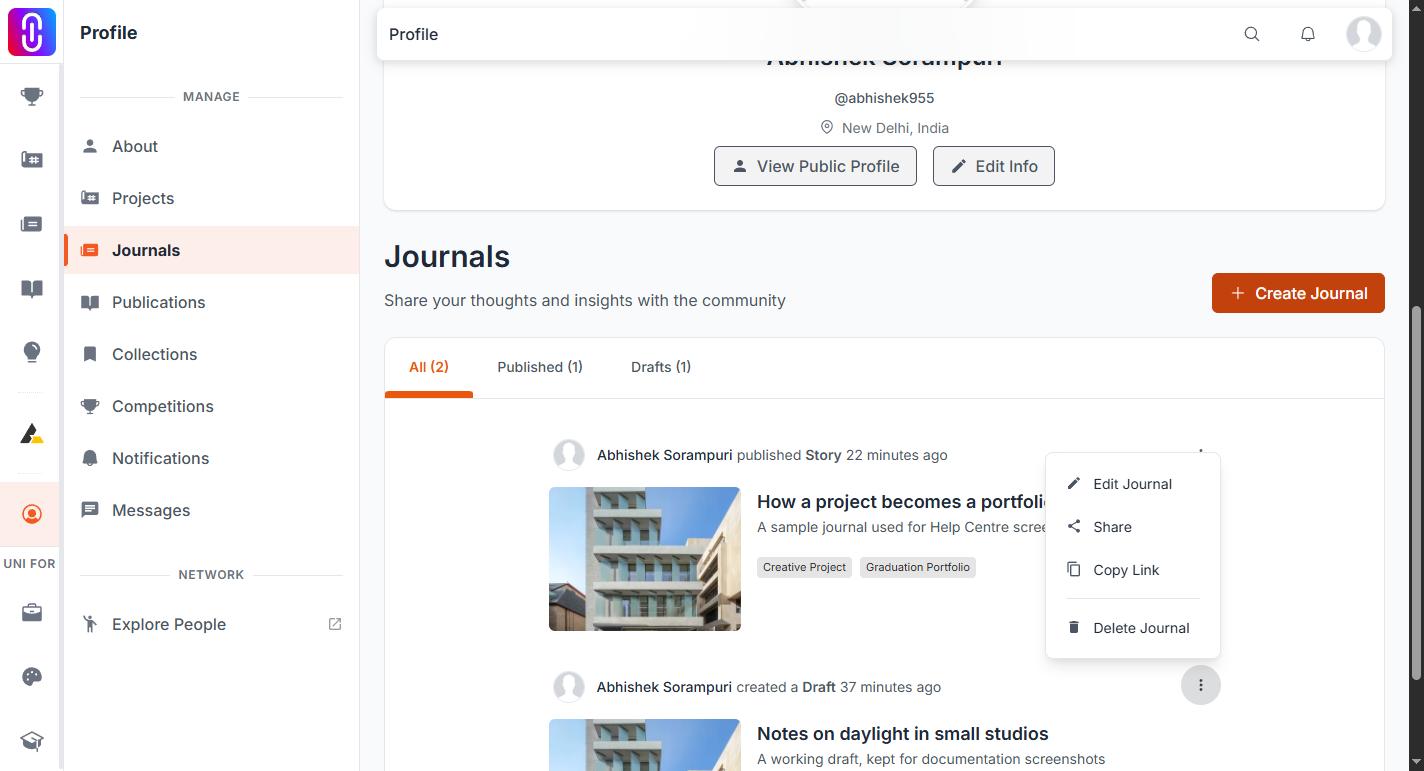
- Open your journal, either its own page or its card in a feed.
- Open the more menu, the three dots in the corner. It only carries owner actions when you are signed in as the author, so if you cannot see Delete, check which account you are on.
- Delete Journal is the last item, below a divider that separates it from Share and Copy Link.
- A box titled Delete Journal asks you to confirm. Nothing is removed until you press the red Delete Journal button in it.
Closing that box or pressing Cancel leaves the journal exactly as it was.
What is destroyed along with it
Everything attached to the journal goes too, because those records only exist in relation to it:
- Every like and every vote it received.
- Every comment and reply on it, including yours.
- Every bookmark of it, and every image inside it that a reader saved to a collection.
- Everyone who followed the journal.
- Its reading score, its references, and its link to any project you connected it to.
- Its view history and its entry in UNI search.
None of that moves anywhere else. If a journal has drawn a discussion you care about, copy the comments out before you delete it.
Its web address dies with it. Any link you have shared, in a portfolio, an email or a post, lands on a missing page from then on. Publishing the same text again creates a new journal with a new address; it does not revive the old one. See Your journal's web address is fixed the first time you publish.
Notifications that went to your followers when you published stay in their inbox, but they now point at nothing.
If the journal is a competition entry, sort out the entry first
This is the one that does real damage. Deleting a journal you submitted to a competition does not withdraw the entry. The entry survives, still registered against the competition, but with nothing attached to it. Jurors open it and find a blank title and no thumbnail. Any certificate it produces has nothing to point at. Nothing on the delete screen warns you, because that check does not exist.
So if the journal is an entry:
- Deal with the entry before you touch the journal. Duplicate or unwanted competition entries covers withdrawing one.
- Delete the journal only once the entry is settled.
There is no unpublish to use instead
Once a journal is published there is no switch that returns it to draft. Deleting is the only action available to you that takes a published journal off UNI, which is why it is worth being certain before you confirm.
If the piece is unfinished rather than unwanted, that is a different situation. Leave it as a draft: a draft is not listed anywhere public and can sit unpublished for as long as you like. Finding your journal drafts covers where they are kept.