The tick in your cart joins a different list from the switches on your notification settings page. Turning those switches off does not cover it, and unticking the box at a later checkout does not take you off it. The way off that list is the unsubscribe link at the bottom of the email itself.
Two lists, one word
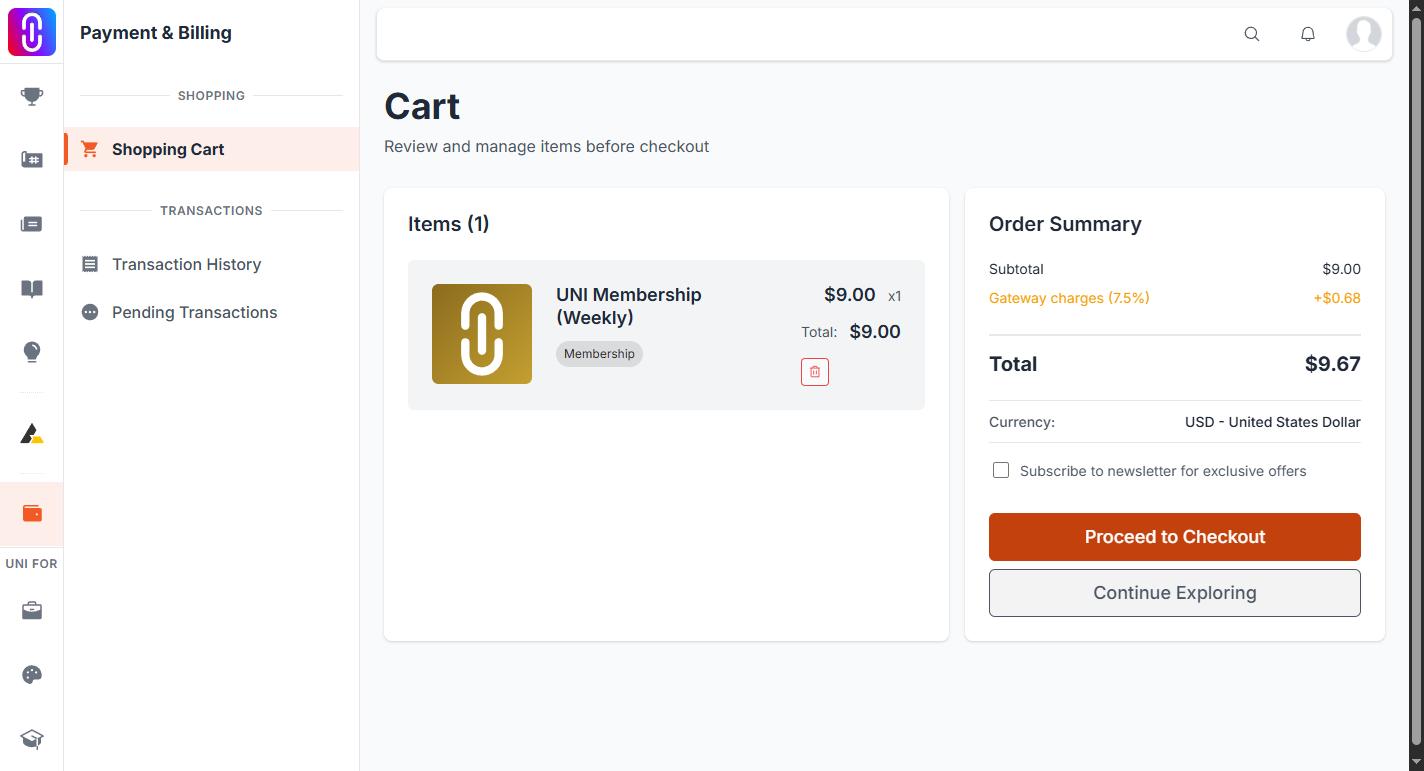
Your notification settings control the mail UNI sends you about competitions, comments, updates and the rest. Each switch there writes to your account.
The checkbox in the cart, labelled "Subscribe to newsletter for exclusive offers", writes your email address to a separate subscriber list that the settings page neither reads nor edits. That is why turning everything off in settings leaves this one running.
Your browser remembers the tick
The box starts unticked. Once you tick it, that choice is stored in the browser you ticked it in and applied again at every later checkout on that browser, without asking. So a second purchase can resubscribe you months later.
Clearing your browser's site data resets it. A different browser, or a different device, starts unticked again.
Unticking is not unsubscribing
The box decides only whether this checkout subscribes you. Unticking it sends nothing at all, so it cannot remove an address that is already on the list. There is no switch anywhere in your settings that removes it either.
How to come off the list
- Open any of those emails.
- Use the unsubscribe link at the bottom.
- Your address is taken off the newsletter list.
The confirmation page then points you at your notification settings. Those are the other list, and you do not have to change anything there for the unsubscribe to hold.
Which mail comes from which
If you are unsure which list an email came from, look for that unsubscribe link. Mail from the newsletter list carries one. Mail driven by your notification settings is controlled from the settings page instead. See Notification settings and the badge.