UNI checkout offers two ways to pay: card, UPI or net banking through Razorpay, and PayPal. You pick your currency first, then the payment method.
What you can pay with
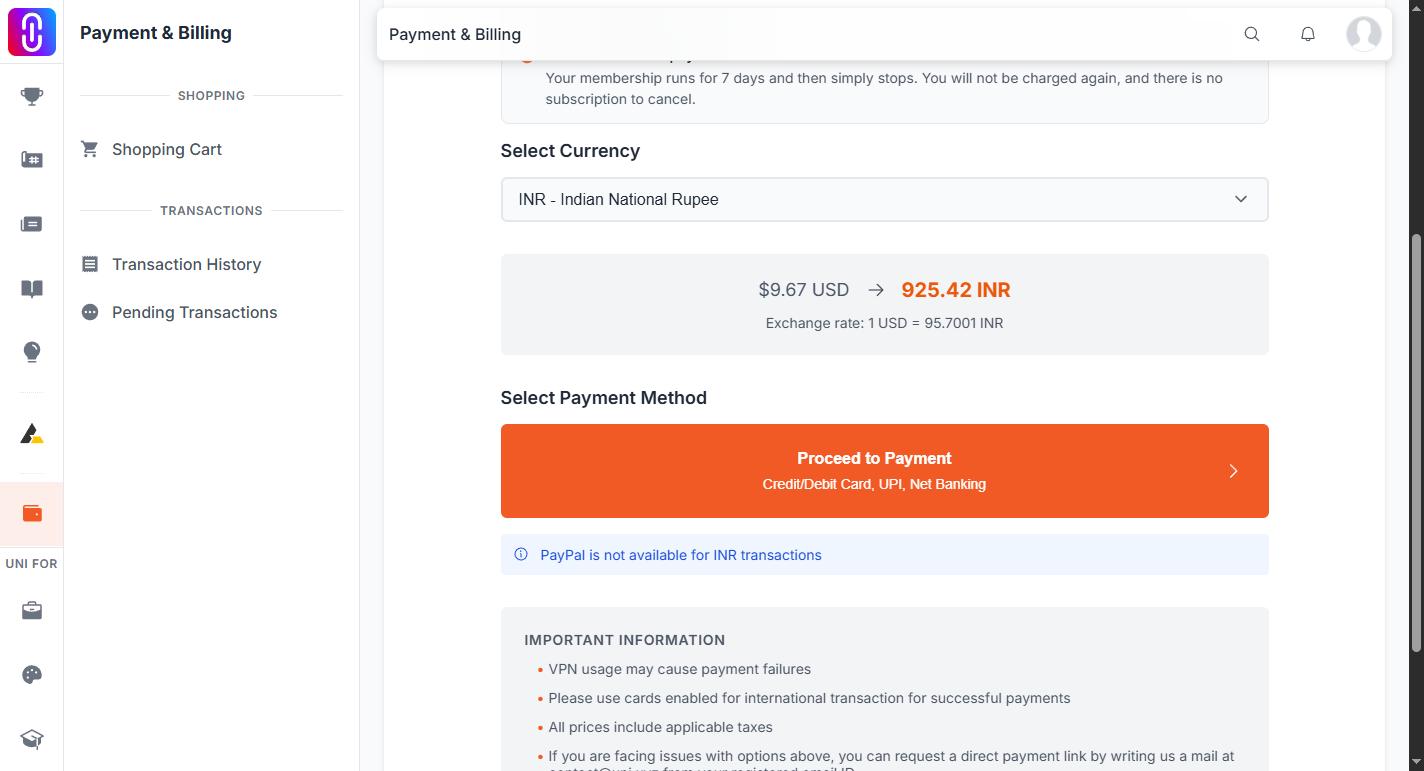
- Proceed to Payment covers credit and debit cards, UPI and net banking. It is available in every supported currency.
- Continue with PayPal covers your PayPal balance and cards linked to PayPal. It is hidden when your selected currency is INR, and checkout says so on the page.
Those are the only two options. There is no cryptocurrency option and no other provider at checkout.
If neither works for you, checkout invites you to email contact@uni.xyz from the address on your account and ask for a direct payment link.
Choosing your currency
Prices on UNI are set in USD and converted at checkout.
- Open your cart and continue to checkout.
- Under Select Currency, pick your currency. UNI pre-selects one from your location and shows a "Detected from" line with the country it used.
- Checkout shows the converted amount and the exchange rate it applied.
- Check the total, then choose a payment method.
27 currencies are supported: AED, AUD, BDT, CAD, CNY, COP, DKK, EGP, EUR, GBP, HKD, IDR, ILS, INR, JPY, LBP, LKR, MAD, MXN, NZD, PKR, QAR, RUB, SEK, SGD, USD and ZAR.
If your currency is not on that list, pick one that is, usually USD or EUR. Your bank then converts at its own rate, so the amount that leaves your account can differ from the figure shown at checkout.
The 7.5% gateway charge
A payment gateway charge of 7.5% is added on top of the listed price. It applies to everything bought through UNI checkout: memberships, competition entry fees and credit packs.
The Order Summary lists it as its own line, Gateway charges (7.5%), above the total, so the full amount is visible before you confirm.
Worked examples in USD:
- $9 becomes $9.67
- $18 becomes $19.35
- $65 becomes $69.88
- $99 becomes $106.42
- $199 becomes $213.92
- $499 becomes $536.42
The gateway charge is non-refundable in every case, including the cases where a membership itself can be refunded.
If your card is declined
Work through these before contacting the team:
- Ask your bank to enable international and online transactions on the card. This is the most common cause.
- Try a VISA or Mastercard if you used a different network.
- Turn off any VPN. Checkout warns that VPN use can cause payment failures.
- Try the other payment option on the page.
If the card still fails, email contact@uni.xyz with the error message shown at checkout, the amount, and what you were paying for.