Nothing was charged. Emptying the cart is what pressing Proceed to Checkout does, and it happens before any payment is involved. Your items were copied into an order of their own, and that order is sitting unpaid in your transaction history.
The order still exists, it is just not in the cart any more
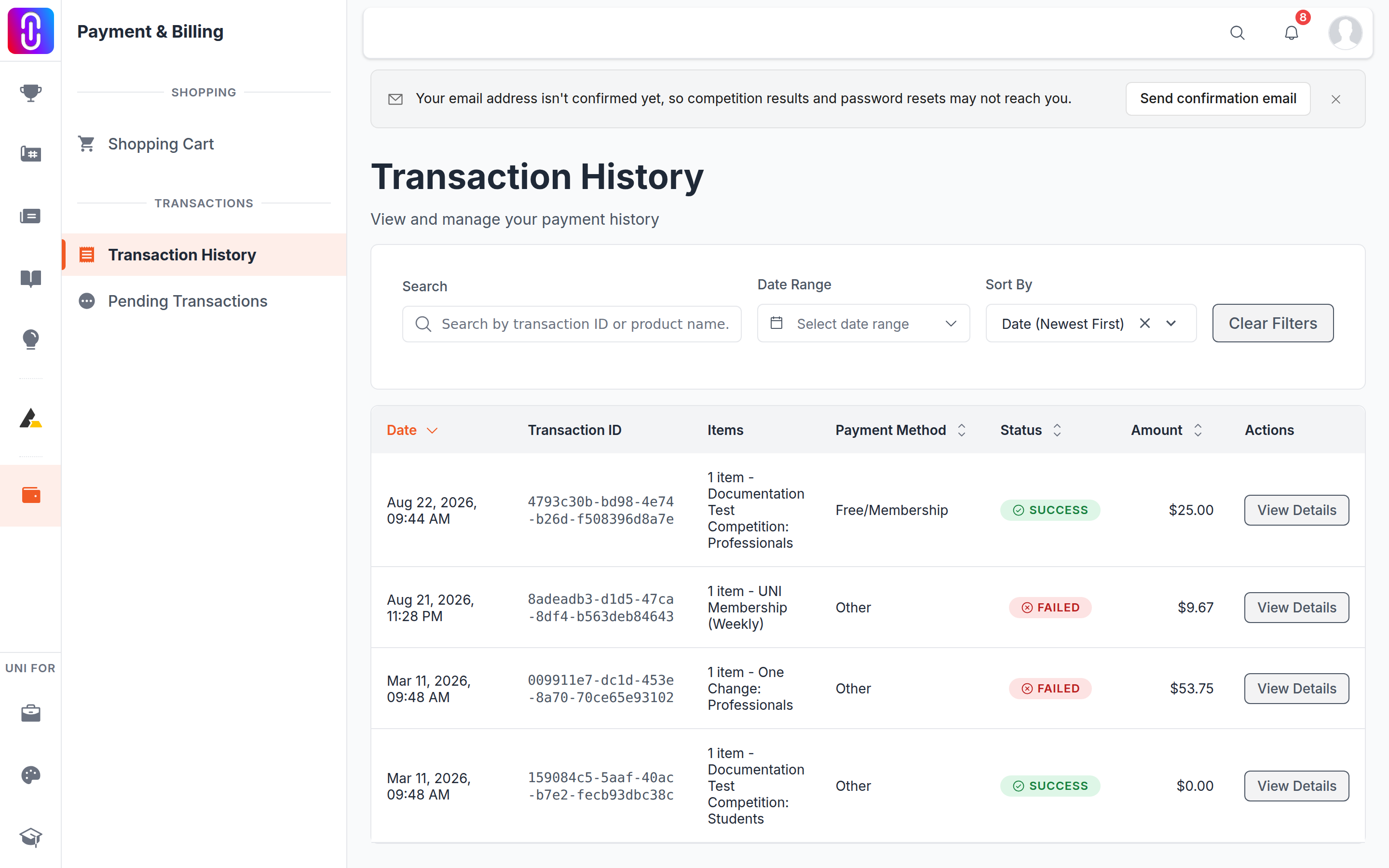
Proceed to Checkout does two things in one step. It copies every item in your cart into a new order with its own reference, then clears the cart so it is ready for whatever you add next. If you went back, closed the tab, or let the checkout page time out, you land on the cart page, and the cart really is empty. The order is not.
Money is only taken later, after you pick a currency and a payment method and finish the payment with the provider. Until that happens no card is charged, no competition entry is registered and no membership starts.
Where to find it
- Go to uni.xyz/payment/transaction/history, or open the payment section and select Transaction History in the sidebar.
- Your unpaid order is the newest row, listed with its items and amount.
- Select View Details, then Try Again. That reopens the payment page for that same order.
The badge on that row reads Failed, which is the part that alarms people. The badge describes the payment rather than the order, and a payment you never started reads the same as one that did not go through. It is not a record of a declined card. For the same reason, the Pending Transactions page in that sidebar will not show it: no payment was ever opened, so there is nothing pending to list.
If the badge reads Pending instead, you got as far as the payment provider before stopping, and that is a different situation. Contact support with the transaction reference rather than paying it again.
If you would rather start over
You cannot delete an unpaid order yourself, and there is no reason to. Add the items to your cart again from the competition or product page and check out fresh. The old order stays in your history as a record of an attempt and does nothing else.
An hour after you leave a checkout unfinished, an email titled Complete your checkout goes out with a direct link back to it, and a second one a day later if it is still unpaid. Those two are the only reminders you will get.
Why it works this way
Every attempt at checkout gets its own order instead of reusing the live cart. That is what makes a half-finished payment something you can return to by its own link, keeps your history a list of real attempts rather than one cart that keeps changing under you, and lets you put new things in your cart while an older order is still unpaid. The cost of that design is the moment you noticed: the cart looks empty the instant you press the button.
An old unpaid order is not a charge
Nothing expires an unpaid order and nothing sweeps it up. There are unpaid orders on UNI from 2019 still sitting exactly where they were left. So if one has been in your history for months, it is not money owed, not a payment queued up, and not something that will suddenly go through. It is a record of a checkout that was started and not finished.
The price is not held either. The amount is recalculated from each item's current price when you open the order, so an old order is not a way to pay an old rate. If it is for a competition and the registration deadline has moved on, start again from the competition page rather than reopening the old order.
If you did complete a payment and the thing you bought never switched on, that is a separate problem: see I paid but my membership still isn't active.
Related
If you saw "Session expired" first
Checkout runs on a two minute timer. If it ran out before you finished paying, you were sent back to the cart, which is why it looked empty. That is the same situation described above and your order is safe. The checkout timer and what "Session expired" means explains it.