
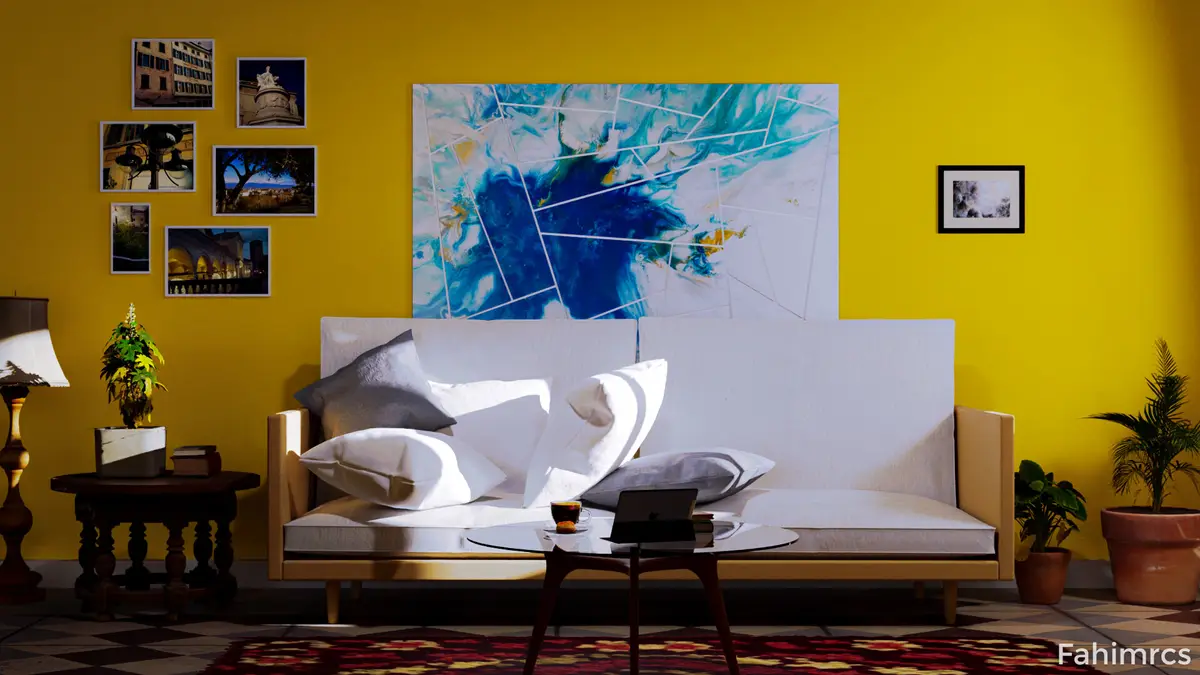
Archviz Interior render with cycles
This is my personal Archviz Interior render project. Total 512 samples cycle render. @ GTX 1050 TI

Creating a photorealistic image of an architecture or interior design project forces us to contextualize the space. The formal expressions of our designs complement each other when we bring them to life with objects, nature, people, vehicles. Visualization professionals use this entourage to contextualize their designs and help the viewer relate to them in the real-world.
Today, adding entourage with rendering millions of polygons is easy — but this was not always the case. In this two-part article, I will talk about some of the methodologies that have made it possible to work with high levels of geometry, and the importance of having a wide library of 3D assets for our work.
A few decades ago, visualization artists faced various challenges when creating projects. The first is that there were not many commercial 3D models with the level of detail that we have today, so artists had to model many of these elements, extending the delivery time of their projects.
This was compounded by the fact that older computers were not capable of managing and rendering many millions of polygons with acceptable speed and practicality.
A common workflow many years ago was to populate a scene using photos and images. These could be of vegetation, people, vehicles, or accessories. Artists used to prepare each element in advance.
Let's use a tree as an example. An artist’s first step would have been to look for an image they wanted of the type, size and the look of the tree. Once they had the image, then they had to carefully cut the silhouette and create its transparency using an application such as Photoshop.
In some scenes, this process had to be completed for a lot of objects. Once completed, artists created several 2D planes in their scenes, aligned to the camera, and applied the images as a texture.
Although this copy-and-paste technique gave acceptable results, it had many limitations. For instance, as images would have been captured with specific lighting conditions, when changing the project’s illumination, the tint the sun would give to the materials of the building would change — but the color of the cutout vegetation would stay the same.
It was also difficult to change the camera angle. If images are aligned with the camera, every perspective looks identical, and if we create sequences, at some point they look flat.
Some other artists decided to do the process completely in post-production using separate apps such as Photoshop to add entourage and effects to their 3D model. With this, there was greater control and better integration.
This last technique is still valuable for many artists, it solves very complex problems and challenges. But it also has some limitations and the process can be very extensive. This implies a full process for every single rendered image, if the client decided to change the camera position, the image had to be started from scratch.
Due to the problems that I have mentioned, many solutions emerged that have been improving over the years.
First, rendering engines and the 3d platforms had to develop new and advanced methodologies for rendering massive scenes and offer easier integration of 3D assets.
Studios and companies started to develop different tools to solve different needs. For instance, today, tools for scattering and instancing to speed up the process of vegetation are available for everyone, and it’s common to see many artists and studios using them in their pipelines of production.
On the other hand, companies specialized in high-quality 3D asset creation emerged. Today, we have easy access to high-detailed 3D models.
Photographic scanning technology is another solution that changed the industry. Geometry and materials can be scanned for hyper realistic rendering results.
And of course, a large community of artists have contributed to creating assets of all kinds, and this is still growing.


Popular Articles
Popular articles from the community


Tenter Studio Steps a Valle de Bravo Holiday House Down a Slope Around a Void Built for Pausing
In Valle de Bravo, Mexico, two dark brick volumes descend a steep plot and frame a deliberate gap, keeping the landscape quiet rather than staged.

Some Thoughts Clamps Felt and Metal Together to Build a Modular Eyewear Store in Wuhan
A 98 m² MOLSION eyewear shop in Wuhan builds its displays from stacked red and grey felt modules held by custom triangular metal fasteners.

GROUP A Strips a 1969 Rotterdam Harbor Headquarters to Its Frame and Wraps It in Timber Louvers
In Rotterdam's M4H harbor district, Ferro Offices reuses a 1969 frame, adds one timber storey and reaches BREEAM-NL Outstanding.

andblack design studio Wraps a Three-Generation Ahmedabad Home Around a Planted, Skylit Central Courtyard
In Ahmedabad, a 9,910 sq ft house uses exposed concrete, brick jali and a skylit green court to give three generations both distance and closeness.

Similar Reads
You might also enjoy these articles


Vereda Arquitetos Renovates a 40-Square-Meter Apartment Inside Niemeyer's Copan Building
A compact unit in São Paulo's most iconic residential tower gets a material overhaul that pairs exposed concrete with bold blue Formica.

Shakur's House: Exposed Brick as an Interior Organiser in a 168 m² Mashhad Residence
Brick moves indoors in this Mashhad residence, where masonry walls, glass partitions and teal planes sequence a compact home without closing it off.
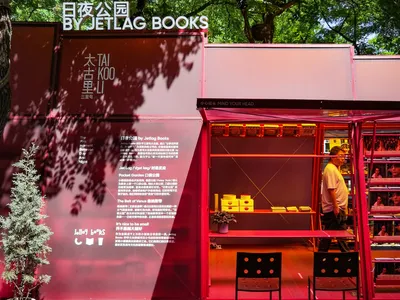
Day and Night Park: A Time-Based Urban Newsstand in Beijing
A temporary urban newsstand in Beijing blending travel, light, and reading through poetic colors, compact form, and community-focused design.

Modernist Patio Renovation in El Masnou, Barcelona by Oliver Segura Arquitectura + Cebrià Arquitectura
Modernist patio renovation blending tradition and innovation with a movable pool, leveled floors, and Catalan materials in El Masnou.

Explore Architectural Rendering Competitions
Discover active competitions in this discipline


Challenge to design luxury tourism on rails

VR headsets Storefront design competition

Designing a staircase for a client
Comments (0)
Please login or sign up to add comments
No comments yet. Be the first to comment!