

3D Visualization
Three-dimensional digital representation and visualization of architectural and design concepts.
3D visualization (also spelled 3D visualisation) is the process of turning a three-dimensional digital model of a design into images, animations or interactive scenes that show how it will look before it is built. In architecture and design it covers everything from photorealistic renders and walkthrough films to diagrams and real-time virtual reality, and it is how designers test their ideas and how clients, juries and the public come to understand them.
What is 3D visualization?
In architecture the discipline goes by several names: architectural illustration, architectural rendering or architectural visualization, often shortened to "archviz". All of them describe the craft of making pictures of a proposed design. What makes 3D visualization distinct is its starting point: a virtual model that exists in three dimensions, so any number of views, lighting conditions and moving sequences can be produced from the same source instead of drawing each one by hand.
It helps to separate three terms that are often used as if they meant the same thing. 3D modeling is building the geometry: walls, floors, terrain, furniture. 3D rendering is the calculation that turns that geometry, with its materials and lights, into a finished image. 3D visualization is the wider practice that includes both, plus the decisions about what to show, from where, in what style and for whom. A good visualization is an argument about a design, not just a picture of it.
The field also differs from adjacent work. Technical drawings and BIM documentation exist to build from; visualization exists to communicate and to judge. Product and entertainment visualization share the same tools, but architectural work carries a particular duty: the building will one day be real, and people will compare it with the image.
Types of 3D visualization
Architectural visualizations vary by output, view and style. The common outputs are:
- Still renders. Single images, the backbone of every competition board and client presentation: exterior and interior views, aerial views, sections and plans with rendered materials.
- Animations and walkthroughs. A sequence of rendered frames along a planned camera path, used to show how a space unfolds as you move through it.
- Real-time and interactive scenes. Game-engine and real-time renderers let a viewer walk through a model freely, change materials on the spot or put on a virtual reality headset and stand inside the design at full scale.
- Photorealistic images. Renders that imitate photography as closely as possible, with physically based materials, measured light and lens effects.
- Conceptual and diagrammatic views. Exploded axonometrics, white models, collages, line work and watercolour-like treatments that explain an idea rather than imitate a photograph, including the flat, collage-based style often called post-digital rendering.

Most real projects mix these. A competition entry might pair one photoreal hero image with diagrams and a short animation, each doing a different job.
How 3D visualization works
Whatever the software, the workflow follows the same stages, much as an architectural rendering always has: decide what the image must say, build it, light it, then finish it.
- Modeling. The design is built as 3D geometry, either in an architectural modeler such as Revit, ArchiCAD, Rhino or SketchUp, or in a general 3D package such as Blender or 3ds Max. Only what the camera will see needs full detail.
- Materials and texturing. Surfaces receive materials that describe colour, roughness, reflection and transparency, usually with image textures mapped onto the geometry so that brick, timber or concrete reads at the right scale.
- Lighting. Sun, sky and artificial lights are placed. Lighting sets time of day and mood, and it is the stage that most separates a convincing image from a flat one.
- Camera. Views are composed like photographs: eye height, focal length, framing and, for animation, the path and speed of movement.
- Rendering. The software calculates the final image. Offline renderers trace the paths of light for high accuracy at the cost of time; real-time engines trade some accuracy for instant feedback.
- Post-production. The raw render is adjusted in an image editor such as Photoshop: colour grading, people and planting, atmosphere, and the graphics that place it on a board.

The order is not strictly linear. Designers often loop back from a test render to change the model itself, which is why visualization is a design tool as much as a presentation one.
A short history of 3D visualization
The idea behind every render, a convincing picture of three-dimensional space on a flat surface, goes back to the Renaissance. Between 1415 and 1420 the Florentine architect Filippo Brunelleschi carried out his experiments in linear perspective, painting views of the Florence Baptistery and checking them against the real building with a mirror. Leon Battista Alberti described the method in his treatise on painting in 1436, and perspective became the standard way to show space for centuries.
For most of the next five hundred years architectural images were made by hand, in watercolour, graphite, charcoal and ink, and rendering was taught in the "master class" tradition of schools such as the École des Beaux-Arts. In the early twentieth century the American delineator Hugh Ferriss made a career drawing other architects' buildings, often at night or in fog. In 1922 he drew four step-by-step perspectives showing the mass that New York's 1916 zoning law allowed, later published in his 1929 book The Metropolis of Tomorrow.

The computer entered the story in January 1963, when Ivan Sutherland submitted his MIT doctoral thesis on Sketchpad, a system that let a user draw directly on a screen with a light pen.
"The Sketchpad system uses drawing as a novel communication medium for a computer."
Ivan Sutherland, Sketchpad: A man-machine graphical communication system (1963)
In the mid-1970s the pioneering computer graphics program at the University of Utah produced one of the field's most famous objects. Martin Newell's digitised model of an ordinary teapot became so widely shared that the Computer History Museum describes it as a benchmark for testing rendering techniques.

Hand and digital craft now sit side by side. The American Society of Architectural Illustrators still awards the Hugh Ferriss Memorial Prize as its top honour, and its 2020 winner was made with a blend of digital programs.
Key principles of 3D visualization
Light carries the meaning
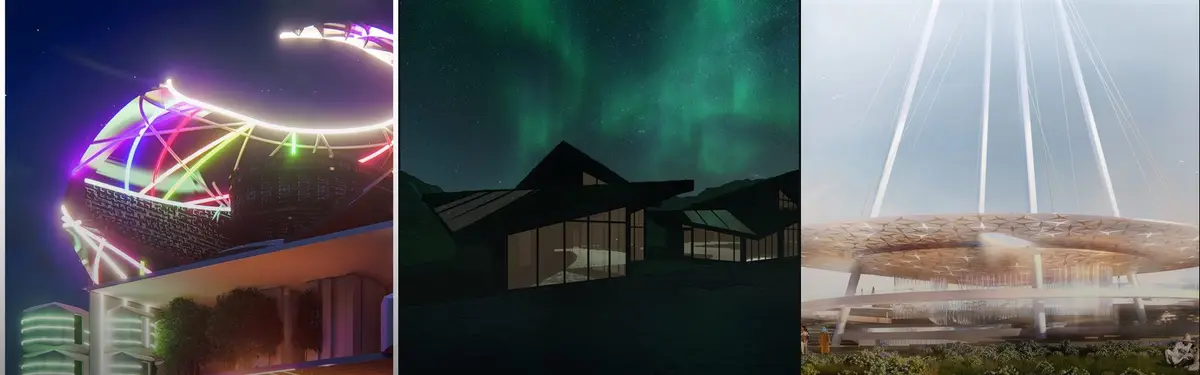
The same model can feel welcoming, austere or theatrical depending on the light. Time of day, the colour of artificial light and where shadows fall tell the viewer what the building is for and how it should feel. In "Wonderoof" in Oasis by Said Daudov and team, an Organizer's Choice Award entry in The Oasis Cultural Center competition, shafts of light falling onto a broad disc-shaped roof make the canopy the subject of the image.

The camera is a design decision
Eye-level views show what a person will actually experience; aerial views explain organisation; wide lenses exaggerate space and can mislead. Choosing the viewpoint is choosing the argument.

Scale needs a reference
People, trees, cars and furniture tell the eye how big things are. Without them, a pavilion and a stadium can look identical. Entourage should be placed with care, at the right size and doing plausible things: crowds at an entrance say "public building" faster than any caption.
Match the fidelity to the stage
Early ideas are better shown as massing, line work or white models, which invite discussion. Full photorealism signals that decisions are made, so it belongs later. A diagram is often more honest than a render.
Represent the design truthfully
A visualization makes a promise. Materials, context, sunlight and surroundings should match what can actually be built on the site, or the image will cost trust when the building is finished.
3D visualization on uni.xyz
The 3D Visualization topic gathers hundreds of member projects and journals in which the images themselves are central to the work. A few show the range especially well.
Rotate 90° by Asli Ozge Zabun, Pelin Gür, Ecrin Akkaya and Hande Zabun is the most liked project in the topic and received a People's Choice Award in the Live x Learn competition. Set in Levent, İstanbul, and tied to the metro, it turns movement from horizontal to vertical and aims to produce energy and water. Its boards are collage rather than photoreal render, a reminder that visualization does not have to imitate a camera.
(RE) ENVISIONING by Pelayo Lopez Suarez-Valdivieso and Belen Garrido won a People's Choice Award in The Digital Colosseum 2020 competition. As our journal on the project describes, it reimagines Sáenz de Oiza's Castellana 81 office tower in Madrid as an e-sports arena with housing pods and gaming simulators, projected forward to 2050 and wrapped in a phosphorescent skin. The night renders sell that future.
Revitalization of the Bakhrushins' heritage by Anna Bogodaeva, Yuliya Volkova, Olesia Chentemirova and Ivan Korshakov was a winning entry in the In Plain Sight competition. It proposes a family quarter on the grounds of a nineteenth-century orphanage named after the Bakhrushin brothers, and its renders set new glazed volumes against the historic brick.
The Frame bench by Marija Hristovska, a winning entry in the Urbanscape : Streetbeat competition, is urban furniture that links old and new: a seat with a lake view, shade by day and a light object at night. Visualization here has to show one object across two conditions.
Amorphous Gaming Center by Joud Alsaht, Hanan Alsahin and Fatima Almagboul received a People's Choice Award in the Reboot competition. The team describes it as a digital universe open to everyone, not only gamers, and presented it through exploded axonometrics, rendered sections and 3D diagrams alongside street-level views full of people.

Journals show the thinking behind the images. In Defining the single logic, kunj explains how the Porosity façade is driven by a single number, each panel's height from 0 at the ground to 1 at the top, run through one formula to set its openness, with privacy and daylight layered on as refinements.
"The goal from the start was to avoid designing 100+ panels individually and instead write one rule the computer could apply to every panel at once."
In Nexus Arena: Where Digital Gaming Meets Public Space, Beste Keskin traces the design from abstract studies to physical models and then to sketches drawn over sections cut from the model. The result is an e-sports arena without conventional amphitheatre seating, where spectators watch from ramps, terraces and bridges as they move.

Together these entries show visualization used to persuade, to explain and to design.
Challenges and future directions
The oldest problem is the gap between image and building. Perfect weather, empty streets and flattering lenses make every proposal look its best, and when the built result looks different, the profession loses credibility. Many juries now value diagrams and honest daylight views as much as the hero shot.
Time and hardware are the second constraint. High-quality offline rendering is slow, and students often spend the final days before a deadline waiting for images rather than improving the design. Real-time engines have shortened that loop and made it possible to review a design interactively or in VR, but they bring their own learning curve.

A third issue is sameness. Shared asset libraries, stock skies and default settings can make thousands of images look alike, which pushes designers toward a personal visual language. Generative image tools add speed but raise harder questions about authorship and about whether an image still describes a buildable design. The likely future is more interactive, more tied to live models and data, and more dependent on judgement about what to show.
3D visualization for students and designers
Visualization is a strong thesis subject when it is treated as research rather than decoration. Possible angles include comparing how photoreal and diagrammatic images change a jury's reading of the same project, testing VR walkthroughs as a participation tool for neighbours, or documenting a design process where rendering decisions changed the building. Rule-based work in computational design pairs naturally with visualization, because every variation can be seen at once.
Competitions are the fastest way to practise: a brief, a deadline and a jury that reads your images first. uni.xyz has run competitions titled Visualization '20 and Visualization '22, and open briefs are listed on the competitions page. Browse archviz projects to see how other members build a board.
Frequently asked questions
What is 3D visualization?
3D visualization is the creation of images, animations or interactive scenes from a three-dimensional digital model. In architecture it shows how a building or space will look before it is built, for design review, competitions, clients and planning.
What is the difference between 3D modeling, 3D rendering and 3D visualization?
Modeling builds the geometry. Rendering calculates an image from that geometry with materials, lights and a camera. Visualization is the whole practice, including choosing what to show and in what style.
What is the difference between 3D visualization and 3D animation?
A still visualization shows one view. An animation is a sequence of rendered frames along a camera path, so it can show movement through a space over time. Most architectural projects use both, with stills for boards and animation for walkthroughs.
What does "3D viz" or "archviz" mean?
Both are informal short forms. "3D viz" means 3D visualization in general, and "archviz" means architectural visualization, the rendering of buildings, interiors and landscapes.
What technology is used for 3D visualization?
A typical setup combines a modeling program (Revit, ArchiCAD, Rhino, SketchUp or Blender), a renderer (an offline ray-tracing renderer or a real-time engine), and an image editor for post-production. VR headsets and real-time engines are increasingly used for interactive reviews.
References and further reading
- Architectural illustration, Wikipedia
- Filippo Brunelleschi, Wikipedia
- Hugh Ferriss, Wikipedia
- Sketchpad: A man-machine graphical communication system (Ivan Sutherland), University of Cambridge Department of Computer Science and Technology
- The Utah Teapot, Computer History Museum
- Hugh Ferriss Memorial Prize, American Society of Architectural Illustrators








Open competitions in 3D Visualization
See all 3D Visualization competitions

Challenge to visualize future spaces of waste

Challenge to visualize slums of 2080

Render competition to represent the city as a machine

Challenge to illustrate the ruins of Petra

Challenge to visualize a collision of the future and past

Challenge to imagine architecture inspired by fiction